Mac下VSCode+LaTeX的解决方案
发表于|更新于
|浏览量:
安装VSCode
 Visual Studio Code - Code Editing. Redefinedcode.visualstudio.com/
在visual studio code官网下载电脑对应版本的安装包并安装
安装VSCode插件
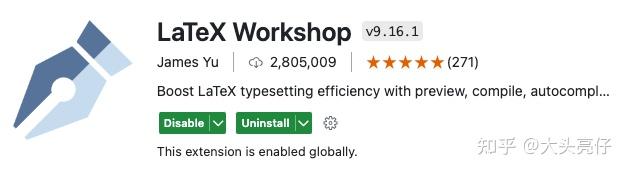
LaTeX Workshop为必装,其他插件可自行选择安装
安装MacTex
在Mac上使用LaTeX的话,除非只使用最基本的语法可以安装轻量化的BasicTex(甚至连公式都不需要输入的情况,应该很少人这样),MacTex是唯一选择。官网解释如下
https://tug.org/mactex/tug.org/mactex/
MacTeX - TeX Users Group
MacTeX - TeX Users Grouptug.org/mactex/
在这里下载安装MacTex.pkg即可,一共会安装5个软件,除了MacTex以外,
- TeXShop
- LaTeXiT
- TeX Live Utility
- BibDesk
- hintview
更简单的安装方式 Homebrew。用mac不用homebrew就相当于没用mac。。。
brew install --cask mactex
使用VSCode配置LaTeX
键盘按cmd+,打开设置(如果是windows的话ctrl+,打开设置),同时点击右上角的Open Settings (JSON)

添加配置至JSON文件
第一个添加的是latex.tools,可以理解为LaTeX在编译的时候会用到的各种command,将它们导入
1
2
3
4
5
6
7
8
9
10
11
12
13
14
15
16
17
18
19
20
21
22
23
24
25
26
27
28
29
30
31
32
33
34
35
36
37
38
39
40
41
42
43
44
| {
...,
"latex-workshop.latex.tools": [
{
"name": "xelatex",
"command": "xelatex",
"args": [
"-synctex=1",
"-interaction=nonstopmode",
"-file-line-error",
"-pdf",
"%DOC%"
]
},
{
"name": "latexmk",
"command": "latexmk",
"args": [
"-synctex=1",
"-interaction=nonstopmode",
"-file-line-error",
"-pdf",
"%DOC%"
]
},
{
"name": "pdflatex",
"command": "pdflatex",
"args": [
"-synctex=1",
"-interaction=nonstopmode",
"-file-line-error",
"%DOC%"
]
},
{
"name": "bibtex",
"command": "bibtex",
"args": [
"%DOCFILE%"
]
}
],
}
|
同时,还有recipe
1
2
3
4
5
6
7
8
9
10
11
12
13
14
15
16
17
18
19
20
21
22
23
24
25
26
27
28
29
| {
...,
"latex-workshop.latex.recipes": [
{
"name": "xelatex",
"tools": [
"xelatex",
]
},
{
"name": "xe->bib->xe->xe",
"tools": [
"xelatex",
"bibtex",
"xelatex",
"xelatex",
]
},
{
"name": "pdf->bib->pdf->pdf",
"tools": [
"pdflatex",
"bibtex",
"pdflatex",
"pdflatex",
]
},
]
}
|
也就是在.tex文件中点击右上角三角形的时候

会调用的命令。默认为第一个,同时可以在边栏选择recipe,选择过后再次点击绿色三角形就会默认使用那个recipe编译(退出窗口后重制)
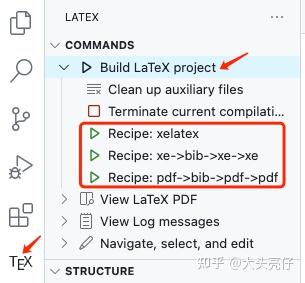
一般情况下xelatex够用了,如果有.bib引用的话就需要用到下面的两个(理论上随便一个都行)
测试
搞定!尝试一下下面的测试代码:
1
2
3
4
5
6
7
8
9
10
11
12
13
14
15
16
17
18
19
20
21
22
23
24
| \documentclass[a4paper]{article}
\usepackage{amssymb, amsmath}
\usepackage[utf8]{inputenc}
\usepackage[USenglish]{babel}
\usepackage[T1]{fontenc}
\usepackage[margin=2.5cm]{geometry}
\usepackage{hyperref}
\usepackage{color}
\usepackage{framed}
\usepackage{graphicx}
\usepackage{float}
\frenchspacing
\title{Project}
\author{Anonymous}
\usepackage{microtype}
\begin{document}
\maketitle
\end{document}
|
感谢原帖https://zhuanlan.zhihu.com/p/673900816
侵 删